Conversations
Conversation Intent
Conversation Intent helps your team understand what a target contact’s reply means and what should happen next.
When a conversation receives a real human reply, 1eyeᴬᴵ analyzes the message, classifies the intent, assigns a reason, and gives the conversation an intent score. This helps your team prioritize follow-up, route conversations, stop outreach when needed, and learn which campaigns are working.
Use Conversation Intent to quickly separate interested replies from not interested replies, understand why someone responded, and take the right next action.
What Conversation Intent is for
Conversation Intent helps your team answer:
Instead of manually reading every reply first, 1eyeᴬᴵ helps classify conversations so your team can focus on the highest-priority responses.
Use Conversation Intent to:
Identify interested target contacts
Identify not interested target contacts
Understand why someone replied
Prioritize meeting, pricing, and info requests
Route referrals to the right person
Schedule later follow-ups
Stop outreach when someone asks to be removed
Exclude poor-fit contacts or companies when appropriate
Review neutral or unclear replies
Improve targeting, messaging, and campaigns over time
Why Conversation Intent matters
Campaigns generate activity.
Conversations generate signals.
Intent tells your team what those signals mean.
Without intent classification, your team has to manually inspect every reply and decide whether it is worth follow-up.
With Conversation Intent, 1eyeᴬᴵ helps your team move faster by showing:
Who is interested
Who is not interested
Why they replied
How confident the classification is
Which conversations need human follow-up
Which contacts or companies should stop receiving outreach
How Conversation Intent works
When a real human reply is detected, 1eyeᴬᴵ evaluates the conversation and assigns:
Intent Status
The overall classification of the conversation.Intent Reason
The reason behind the classification.Intent Score
The confidence level for the classification.
Together, these fields help your team understand what happened and what to do next.
Intent Status
Intent Status is the high-level classification of the conversation.
Common statuses include:
Intent Status | What it means |
|---|---|
Positive | The target contact appears interested or willing to continue. |
Neutral | The reply is unclear, weak, or needs manual review. |
Negative | The target contact is not interested or should not continue in outreach. |
Use Intent Status as the first filter when reviewing replies.
Start with Positive when you want to follow up on interested contacts.
Review Negative when you need to stop outreach, clean records, or understand disqualification reasons.
Review Neutral when the reply needs judgment.
Positive intent
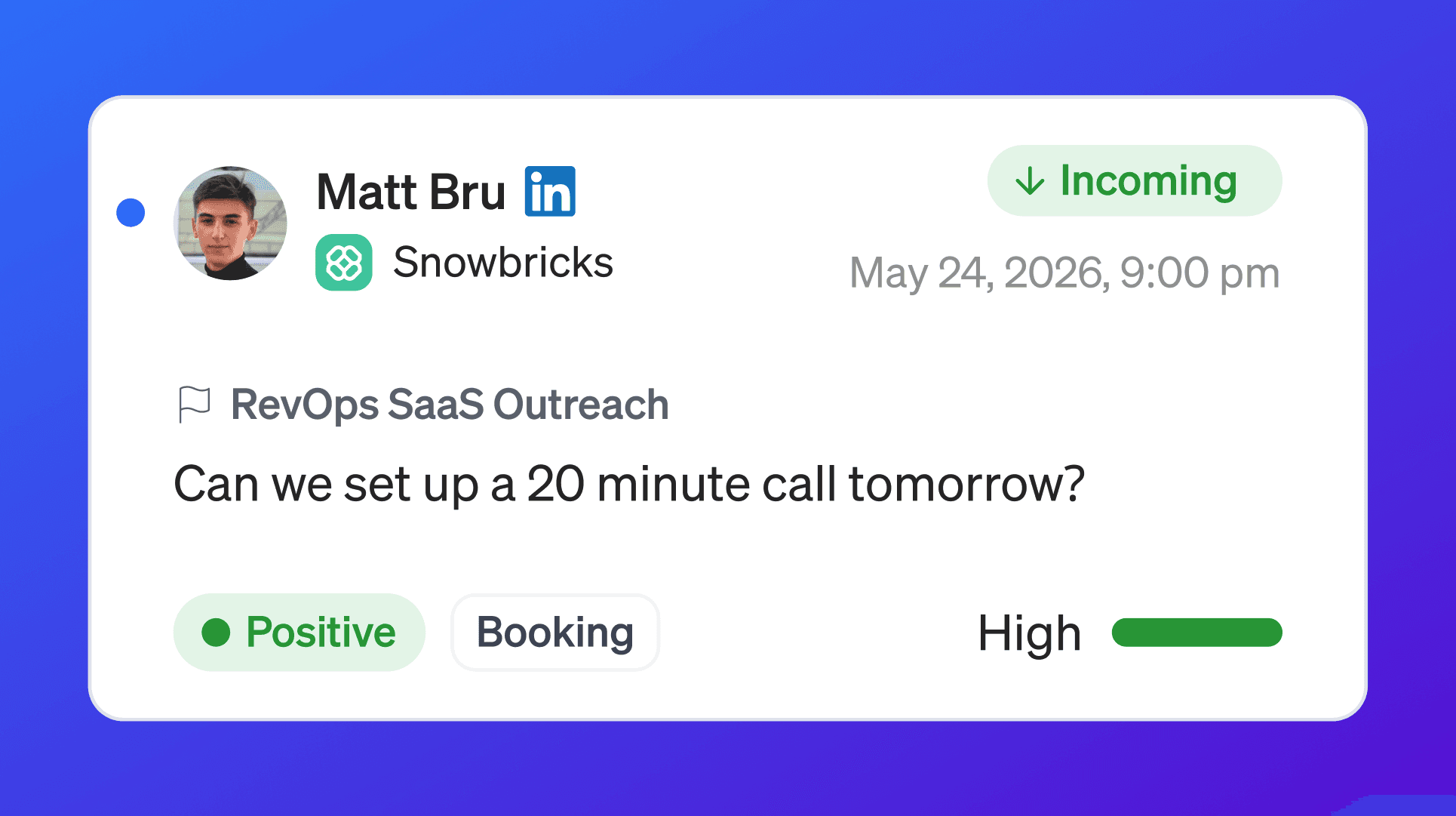
Positive intent means the target contact shows interest or willingness to continue.
A positive reply may include:
Asking for a meeting
Asking for pricing
Asking for more information
Asking for docs or details
Asking how to set something up
Asking to reconnect later
Referring you to another person
Asking a product or support question
Showing curiosity or interest
Positive replies should usually be reviewed quickly.
Examples:
Neutral intent
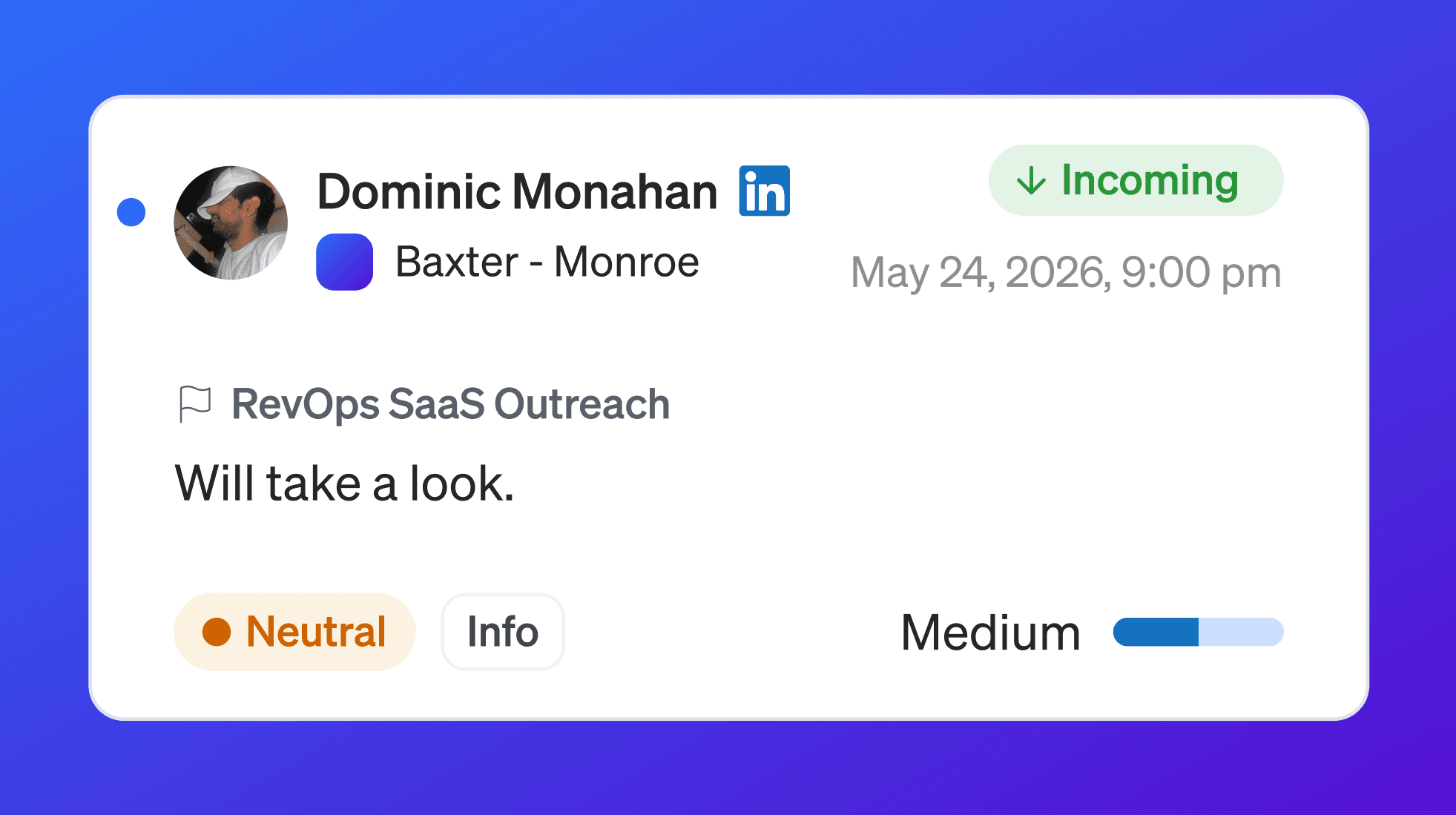
Neutral intent means the reply does not clearly show interest or disinterest.
A neutral reply may include:
A vague response
A short acknowledgement
A message that needs manual review
A reply without a clear next step
A reply that does not strongly indicate positive or negative intent
Examples:
Neutral replies should not be ignored. Some can turn into positive conversations with the right follow-up.
Negative intent

Negative intent means the target contact is not interested, not a fit, or should not continue in outreach.
A negative reply may include:
No need
No budget
Competitor selected
Wrong person
Not responsible
Requested removal
Unsubscribe request
Clear rejection
Examples:
Negative replies should be handled carefully.
If someone asks to be removed, stop outreach.
Intent Reason
Intent Reason explains why a conversation received its intent status.
The reason helps your team route the conversation to the right next step.
For example:
means the target contact appears interested and wants to schedule time.
means the target contact does not want to be contacted again.
Positive intent reasons
Positive intent reasons include:
Reason | What it means |
|---|---|
Meeting | The contact asks to schedule a call, meeting, or demo. |
Pricing | The contact asks about price, plan, contract, procurement, or commercial terms. |
Info | The contact asks for docs, deck, case studies, details, or next steps. |
Support | The contact asks for help using the product or troubleshooting. |
Later | The contact asks to reconnect later or postpones the conversation. |
Referral | The contact redirects you to another person or team. |
Other | The contact appears interested, but the reason does not fit another category. |
Meeting
Use Meeting when the contact asks to schedule time.
Examples:
Recommended action:
Reply quickly
Offer time slots or send a scheduling link
Include relevant context from the campaign
Move the conversation forward while interest is fresh
Pricing
Use Pricing when the contact asks about cost, plan, contract, procurement, or commercial terms.
Examples:
Recommended action:
Send pricing details or route to the right person
Ask a qualifying question if needed
Keep the reply specific to the target company and use case
Avoid sending generic pricing without context if the deal needs qualification
Info
Use Info when the contact asks for more information.
Examples:
Recommended action:
Send the requested information
Keep the reply concise
Tie the material back to the contact’s company or persona
Offer a simple next step
Support
Use Support when the contact asks for help using the product or troubleshooting.
Examples:
Recommended action:
Route to support or customer success if needed
Provide clear next steps
Ask for missing details if required
Avoid treating a support question like a sales reply
Later
Use Later when the contact asks to reconnect at another time.
Examples:
Recommended action:
Respect the timing
Schedule a follow-up
Stop immediate campaign steps if appropriate
Add context so the later follow-up is relevant
Referral
Use Referral when the contact points you to another person or team.
Examples:
Recommended action:
Identify the referred person
Add or source the right contact
Reference the referral carefully
Avoid continuing outreach to the wrong person if they are not responsible
Other positive intent
Use Other when the contact appears interested but the reason does not fit meeting, pricing, info, support, later, or referral.
Examples:
Recommended action:
Review the conversation manually
Decide the best next step
Respond with context
Try to move the conversation toward a clearer next action
Negative intent reasons
Negative intent reasons include:
Reason | What it means |
|---|---|
Competitor | The contact says they are using or chose another vendor. |
Budget | The contact says budget is unavailable, frozen, or not approved. |
No Need | The contact says they do not have the problem or it is not a priority. |
Wrong Persona | The contact is not the right person or not responsible. |
Requested Remove | The contact asks to unsubscribe, be removed, or not be contacted again. |
Other | The contact is not interested, but the reason does not fit another category. |
Competitor
Use Competitor when the contact says they are using or chose another vendor.
Examples:
Recommended action:
Stop or pause outreach based on your process
Review whether the company should be excluded
Capture the competitor context if useful
Do not keep pushing the same campaign message
Budget
Use Budget when the contact says budget is unavailable or blocked.
Examples:
Recommended action:
Stop or pause outreach based on your process
Consider a later follow-up if appropriate
Do not keep sending immediate sales messages
Use the reply to improve qualification
No Need
Use No Need when the contact says the company does not have the problem or it is not a priority.
Examples:
Recommended action:
Stop outreach for that motion
Review whether the company should be excluded
Use the response to improve ICP targeting
Avoid continuing the same sequence
Wrong Persona
Use Wrong Persona when the contact says they are not the right person or not responsible.
Examples:
Recommended action:
Stop outreach to that contact
Keep the company if it still fits the ICP
Find the correct persona
Source or add the right target contact
Wrong persona is different from no need.
The company may still be a good fit, but the person is not.
Requested Remove
Use Requested Remove when the contact asks not to be contacted again.
Examples:
Recommended action:
Stop outreach immediately
Mark the contact as Excluded
Respect the opt-out
Do not add the contact to future campaigns
This is one of the most important intent reasons to handle correctly.
Other negative intent
Use Other when the contact is clearly not interested but the reason does not fit competitor, budget, no need, wrong persona, or requested remove.
Examples:
Recommended action:
Stop or pause outreach based on the message
Review manually if needed
Update contact or company status appropriately
Use the response to improve targeting and messaging
Intent Score
Intent Score indicates confidence in the intent classification.
A higher score means 1eyeᴬᴵ is more confident in the status and reason.
Examples:
Intent Score | How to think about it |
|---|---|
High | Strong confidence. The reply is clear. |
Medium | Reasonable confidence. The reply may still need review. |
Low | Weak confidence. Manual review is recommended. |
Intent Score should help prioritize review, not replace human judgment.
How to use Intent Score
Use Intent Score to decide which conversations need attention first.
For example:
High score + Positive + Meeting should be followed up quickly.
High score + Negative + Requested Remove should be handled immediately.
Low score + Neutral should be reviewed manually.
Medium score + Referral may need a person to inspect the thread.
Intent Score is especially useful when you have a high volume of replies.
Conversation Intent fields
A conversation intent record may include:
Intent status
Intent score
Interested reason
Not interested reason
Created date
These fields help 1eyeᴬᴵ organize the conversation and power reporting, routing, and automation.
How Conversation Intent affects contact status
Conversation Intent can update contact status.
Common rules:
Conversation result | Contact status behavior |
|---|---|
Positive intent | Contact may be marked Engaged. |
Requested remove | Contact should be marked Excluded. |
Wrong persona | Contact should be marked Excluded, but the company may remain valid. |
Bounce or automated response | Contact may be excluded based on deliverability or routing rules, but not because of human intent. |
This helps keep campaign outreach clean and prevents repeated outreach to contacts who should not be contacted.
How Conversation Intent affects company status
Conversation Intent can also affect company status when the response applies to the whole account.
For example:
Conversation result | Company status behavior |
|---|---|
Positive intent from a relevant contact | Company may be marked Engaged. |
Competitor | Company may be marked Excluded. |
Budget | Company may be marked Excluded or deprioritized based on your process. |
No Need | Company may be marked Excluded. |
Wrong persona | Company should usually remain active if it still fits the ICP. |
Be careful with company-level changes.
One wrong-person reply should not automatically disqualify the whole company.
Contact vs company handling
Not every reply should affect the whole company.
Use this simple rule:
Examples:
Reply | Best handling |
|---|---|
“I am not the right person.” | Exclude the contact, keep the company. |
“We do not need this.” | Exclude or deprioritize the company based on your process. |
“We already use another vendor.” | Exclude or deprioritize the company based on your process. |
“Please remove me.” | Exclude the contact. |
“Talk to our CFO.” | Find or add the referred contact. |
Interested vs positive
In the product, you may see positive intent in the UI.
Conceptually, positive intent means the target contact is interested or willing to continue.
Examples:
Meeting request
Pricing question
Info request
Support question
Later follow-up
Referral
Positive does not always mean “ready to buy.”
It means the conversation should likely continue.
Not interested vs negative
In the product, you may see negative intent in the UI.
Conceptually, negative intent means the target contact is not interested, not a fit, or should not continue in the current workflow.
Examples:
Competitor
Budget issue
No need
Wrong persona
Requested remove
Other disqualification
Negative does not always mean the entire company is permanently bad.
Review the reason before taking company-level action.
How Conversation Intent powers routing
Conversation Intent can help route follow-up actions.
Examples:
Intent | Routing |
|---|---|
Meeting | Route to owner or sales rep for scheduling. |
Pricing | Route to sales or account owner. |
Info | Send requested material or assign follow-up. |
Support | Route to support or customer success. |
Later | Create follow-up reminder. |
Referral | Add or source referred contact. |
Requested Remove | Exclude contact and stop outreach. |
Wrong Persona | Exclude contact and source correct persona. |
This helps your team respond faster and more consistently.
How Conversation Intent powers reporting
Conversation Intent helps your team understand campaign quality.
You can use intent data to answer:
Which campaigns create positive replies?
Which channels create the best replies?
Which ICPs create the most meetings?
Which personas ask for pricing?
Which campaigns create too many wrong-person replies?
Which lists create the most negative replies?
Which messages generate high-intent conversations?
Which target segments need better qualification?
Intent is not just for follow-up. It is also feedback for your GTM strategy.
How Conversation Intent powers automation
Conversation Intent can support downstream automation.
Examples:
Create a task for a meeting request
Create a reminder for a later follow-up
Stop outreach after requested remove
Route pricing replies to sales
Route support questions to support
Source a new contact after wrong persona
Mark contacts or companies as Engaged
Mark excluded contacts or companies when appropriate
Use automation carefully.
High-impact negative actions, such as exclusions, should follow your company’s policy.
Special case: out-of-office replies
Out-of-office replies are not buying intent.
An out-of-office reply should not be treated as positive or negative intent by itself.
Examples:
Recommended handling:
Do not classify the OOO reply as real human intent
Extract the return date when available
Schedule follow-up after the return date
If no return date is available, follow your team’s default follow-up timing
Wait for a real human reply before assigning intent
Out-of-office messages are useful operationally, but they are not conversation intent.
Special case: bounce or delivery failure
A bounce is not conversation intent.
A bounce means the message could not be delivered.
Examples:
Recommended handling:
Do not classify the bounce as positive, neutral, or negative human intent
Review the contact data
Mark or exclude the contact if the address is invalid
Fix or enrich the contact before trying again
Review Not Delivered messages
Bounces are deliverability signals, not human replies.
Special case: automated responses
Automated responses are not real human intent.
Examples:
Recommended handling:
Do not classify the automated response as human buying intent
Review whether the contact or email address is valid
Exclude or clean the record if needed
Wait for a real human reply before assigning intent
Automated responses can still be useful for routing or cleanup, but they should not be treated like a prospect reply.
Special case: unsubscribe or opt-out
An unsubscribe or opt-out request should be handled immediately.
Examples:
Recommended handling:
Mark the contact as Excluded
Stop outreach to the contact
Do not add the contact to future campaigns
Respect the request
This is not just a negative reply. It is a stop signal.
Special case: wrong person
Wrong person means the contact is not responsible, but the company may still be a fit.
Examples:
Recommended handling:
Mark the contact as Excluded or stop outreach to that contact
Keep the company active if it still matches the ICP
Add or source the right target contact
Use the referral if one was provided
Do not exclude the whole company just because one person is the wrong persona.
Special case: referral
Referral is a positive signal because the conversation can continue with the right person.
Examples:
Recommended handling:
Add or source the referred contact
Use the referral context in follow-up
Stop or reduce outreach to the original contact if they are not responsible
Keep the company active if it matches the ICP
Referral replies often help improve targeting.
Special case: later
Later means the contact is not ready now but may be open in the future.
Examples:
Recommended handling:
Stop immediate campaign steps if appropriate
Create a follow-up reminder
Respect the requested timing
Keep the context for the next follow-up
Later is not the same as no need.
Reviewing Conversation Intent
When reviewing intent, look at the full context.
Do not rely on one label without reading the conversation when the situation is important.
Review:
Contact name
Contact title
Persona
Company
ICP
Campaign
Channel
Message history
Intent status
Intent reason
Intent score
This helps avoid bad follow-up decisions.
Search and filter by intent
Use Conversation filters to focus on specific intent groups.
Common filters include:
Intent Status
Intent Reason
Intent Score
Campaign
Company
Channel
Direction
Updated Date
Examples:
Use filters to quickly find the conversations that need action.
Recommended workflow: daily intent review
Use this workflow every day.
Open Conversations
Go to Positive
Review Meeting replies first
Review Pricing replies
Review Info replies
Review Later and Referral replies
Open Neutral and review unclear replies
Open Negative and handle Requested Remove first
Review Wrong Persona and source better contacts
Review Not Delivered separately
Update contact and company status when needed
Use learnings to improve campaigns
Recommended workflow: positive replies
Use this workflow for positive conversations.
Open the conversation
Review intent reason
Review intent score
Read the full message history
Review the contact persona
Review the company ICP
Decide the next action
Reply quickly
Update notes or tasks if needed
Stop unnecessary automated follow-ups
Positive replies should not sit untouched.
Recommended workflow: negative replies
Use this workflow for negative conversations.
Open the conversation
Review intent reason
Read the full message
Check whether it applies to the contact or the company
Exclude the contact if needed
Exclude or deprioritize the company if needed
Stop outreach where appropriate
Capture useful disqualification context
Use the feedback to improve targeting
Negative replies can improve your GTM system if you use them properly.
Recommended workflow: neutral replies
Use this workflow for neutral conversations.
Open the conversation
Read the full thread
Review contact and company context
Decide whether the reply is actually positive, negative, or unclear
Send a clarifying follow-up if appropriate
Update follow-up notes if needed
Let the campaign continue only if outreach still makes sense
Neutral replies need human judgment.
Recommended workflow: requested remove
Use this workflow for opt-out requests.
Open the conversation
Confirm the contact asked to be removed or unsubscribed
Mark the contact as Excluded
Stop outreach to the contact
Do not add the contact to future campaigns
Review whether company-level exclusion is needed
Document if required by your team process
This should be handled immediately.
Recommended workflow: wrong persona
Use this workflow when the reply says the person is not responsible.
Open the conversation
Confirm it is a wrong-person reply
Mark the contact as Excluded if appropriate
Keep the company active if it still matches the ICP
Source or add the correct persona
Use referral context if the contact provided a name
Avoid continuing the same outreach to the wrong person
Wrong persona is a targeting improvement opportunity.
Recommended workflow: later follow-up
Use this workflow when the contact asks you to follow up later.
Open the conversation
Identify the requested timing
Create a reminder or task
Stop immediate outreach if appropriate
Add context for the future follow-up
Follow up at the requested time
Respecting timing improves trust.
Best practices
Start with Positive intent
Meeting, pricing, and info replies should get attention first.Use reason, not just status
Positive is helpful, but Meeting vs Pricing vs Referral requires different action.Use score to prioritize
High-confidence positive replies should be reviewed quickly.Read the full conversation before important actions
Intent classification helps, but context still matters.Respect Requested Remove immediately
Stop outreach and exclude the contact.Do not treat OOO as buying intent
Out-of-office messages are scheduling signals, not interest.Do not treat bounces as intent
Bounces are deliverability issues.Separate wrong person from bad company
Wrong persona does not mean the company is a bad ICP.Use referrals well
Referral replies can lead you to the right target contact.Use negative replies to improve targeting
Budget, competitor, and no need replies can reveal weak segments.Use neutral replies for manual review
Some neutral replies are hidden opportunities.Keep Knowledge Base updated
Better ICPs and personas improve targeting and reduce wrong-person replies.Review intent by campaign
Compare intent quality across campaigns to see what works.Review intent by channel
Email, LinkedIn, and iMessage may produce different response quality.Do not over-automate sensitive outcomes
Use care when excluding contacts or companies.
Troubleshooting
Intent looks wrong
Read the full conversation.
The reply may be vague, sarcastic, automated, or missing context.
Check:
Message history
Contact role
Company context
Campaign message
Channel
Whether the reply was human or automated
A positive reply was marked neutral
This can happen when the reply is short or unclear.
Review the conversation manually and take the right follow-up action.
A negative reply was marked neutral
This can happen when the reply is indirect.
Review whether the contact is actually declining, delaying, or asking to stop.
A wrong-person reply was marked negative
That may be correct at the contact level, but do not automatically exclude the company.
Find the correct target contact if the company still matches the ICP.
An out-of-office reply has intent
Out-of-office replies should not be treated as buying intent by themselves.
Use the return date for follow-up timing.
A bounce appears in conversations
A bounce may appear as a message or delivery issue, but it is not human intent.
Review the contact data and delivery status.
A requested remove reply needs action
Stop outreach and exclude the contact.
Do not wait for the campaign to continue.
Intent score is low
Low score means the classification may need manual review.
Read the conversation before taking action.
Intent reason is Other
Other means the reply does not cleanly fit a standard reason.
Review manually and decide the next action.
Positive replies are not creating follow-up
Check your workflow, routing, tasks, and team process.
Intent helps identify the reply, but your team still needs a follow-up motion.
FAQ
What is Conversation Intent?
Conversation Intent is 1eyeᴬᴵ’s classification of a conversation based on the target contact’s reply.
What does Intent Status mean?
Intent Status shows whether the conversation is Positive, Neutral, or Negative.
What does Positive mean?
Positive means the target contact appears interested or willing to continue.
What does Neutral mean?
Neutral means the reply is unclear or needs manual review.
What does Negative mean?
Negative means the target contact is not interested, not a fit, or should not continue in outreach.
What is Intent Reason?
Intent Reason explains why the conversation was classified that way.
What are positive intent reasons?
Positive reasons include meeting, pricing, info, support, later, referral, and other.
What are negative intent reasons?
Negative reasons include competitor, budget, no need, wrong persona, requested remove, and other.
What is Intent Score?
Intent Score indicates confidence in the intent classification.
Should I only follow up with high-score replies?
No. High-score replies are easier to prioritize, but lower-score replies may still be valuable. Review them manually.
Are out-of-office replies considered intent?
No. Out-of-office replies are not real buying intent by themselves.
Are bounces considered intent?
No. Bounces are delivery signals, not human intent.
Are automated replies considered intent?
No. Automated replies should not be treated as human buying intent.
What should I do with Requested Remove?
Stop outreach and mark the contact as Excluded.
What should I do with Wrong Persona?
Stop outreach to that contact and find the right target contact. Do not automatically exclude the whole company.
What should I do with Referral?
Follow up with the referred person or team and use the referral context.
What should I do with Later?
Schedule a follow-up for the requested time and avoid continuing immediate outreach.
Can intent affect contact status?
Yes. Positive intent may mark a contact as Engaged. Requested remove or wrong persona may mark a contact as Excluded.
Can intent affect company status?
Yes, when the reply applies to the company. Competitor, budget, or no need may affect company-level status depending on your process.
Should intent replace human review?
No. Intent helps prioritize and route conversations, but important replies should still be reviewed by a person.
How should I use Conversation Intent every day?
Start with Positive, handle Meeting and Pricing first, review Neutral manually, and handle Requested Remove or other Negative replies carefully.
Next step
Next, go to Email Messages to review email-specific message activity, replies, delivery outcomes, and conversation history.